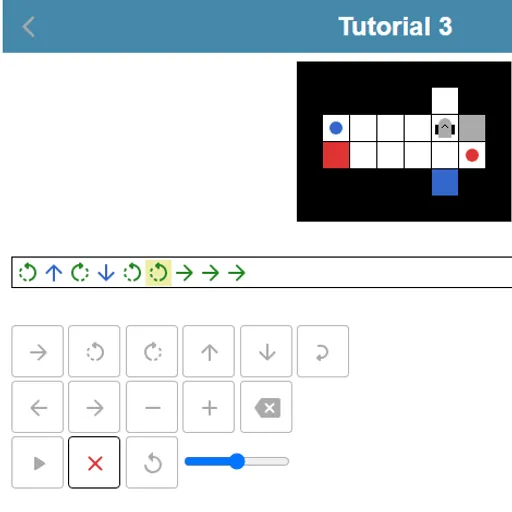
Robot Coder is a small programming puzzle that rewards careful planning. A robot sits on a grid next to colored items and matching colored targets. You write the robot’s whole program before it moves, then press play and watch it go. It is a friendly way to learn how code runs step by step, and it was made for js13kGames 2018, so it loads in a flash.
The Goal
Deliver every item to a target of the same color. The robot can carry only one item at a time, but it may set one down on an empty square and pick it up later. The menu opens with three tutorials, then four themed groups with 21 more levels unlock as you go.
How a Round Plays Out
- Build a row of commands. A green arrow steps forward, curved arrows turn left or right, and blue arrows take or drop an item.
- The robot always acts on the square right in front of it, never the one it stands on.
- Wrap part of the program in a loop to repeat it two to nine times.
- Press play. The robot runs the program from start to finish.
- A run fails if the robot drives into a wall, item or target, takes from an empty square, drops in the wrong spot or stops with targets left.
- A message explains the failure, and reset puts the board back.
A speed slider next to play lets you slow the run, and the current command lights up as it runs.
Keys and Buttons for Robot Coder
| What you do | ⌨ Keyboard | 🖱 Mouse | 👆 Touch |
|---|---|---|---|
| Add a step forward | Underscore (_) | Click the forward arrow key | Tap the forward arrow key |
| Turn left or right | < or > | Click a turn key | Tap a turn key |
| Take or drop an item | Up arrow (take), Down arrow (drop) | Click the up or down arrow key | Tap the up or down arrow key |
| Add a repeat loop | Type a number from 2 to 9, then + or - to change it | Click the loop key, then plus or minus | Tap the loop key, then plus or minus |
| Move the cursor or delete | Left/Right arrows, Home, End, Backspace | Click the left, right or delete keys | Tap the left, right or delete keys |
| Run the robot | Enter | Click the play button | Tap the play button |
Winning Strategies
- Count squares before typing. Trace each path on the board, and remember the robot must face the item, not stand on it.
- Track your heading. A pair of same-side turns leaves the robot pointing backward.
- Use parking spots. Dropping an item on a free square for later can open an otherwise blocked path.
- Debug at low speed. Slow the run and watch the highlighted command to find the exact step that fails.
- Solve first, shrink second. Get any working program, then swap repeated steps for loops to earn stars.
Common Mistakes
- Placing a turn one step too early or late.
- Forgetting the robot can hold only one item.
- Driving forward onto a target square, which counts as a crash.
Who Should Play It
Robot Coder is great for kids and adults who are curious about coding, and for anyone who likes careful planning puzzles. If you enjoy block-based coding games or turn-based logic mazes, this one makes a nice next step.
Played and checked by the KBHX Games team · updated