Black Box Lasers is a quiet logic puzzle about seeing without looking. A few balls sit somewhere inside a dark grid, and the only way to find them is to send beams in from the edges and note what happens. It comes from a 1977 board game by Eric Solomon, and this version was written by James Harvey for Simon Tatham’s puzzle collection. Each box takes a few minutes, and a sharp guess on the last ball feels great.
The Goal
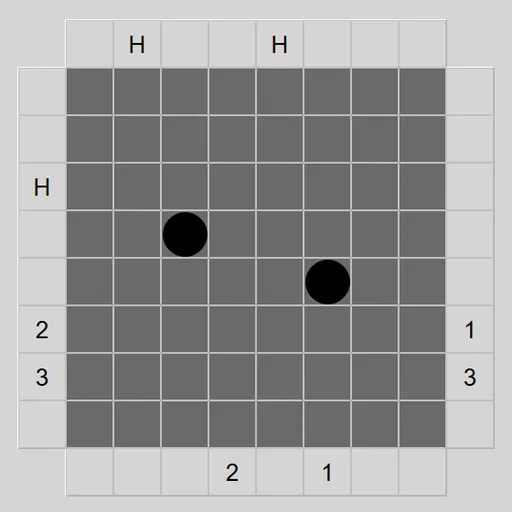
Mark every hidden ball in the right square. The standard box is 8x8 with five balls, and a counter shows how many you have placed. When your count matches, a check button shows up in the top left corner.
Rules Explained
Pick a square on the outer ring to fire. The beam goes straight until a ball changes its path:
- A ball directly in front stops the beam. The entry square shows H, for hit.
- A ball diagonally ahead turns the beam 90 degrees, away from that ball.
- If the beam ends up leaving where it came in, or is turned at the very first step, you get R, for reflection.
- If it leaves from another square, both ends get the same number.
A single beam can turn several times before it leaves. When you are ready, press check. Solve shows the real layout with your right and wrong marks.
Keys and Buttons for Black Box Lasers
| What you do | ⌨ Keyboard | 🖱 Mouse | 👆 Touch |
|---|---|---|---|
| Fire a laser | Arrow keys to an edge square, then Enter | Left-click a square on the edge | Tap a square on the edge |
| Place or remove a guessed ball | Arrow keys inside the box, then Enter | Left-click inside the box | Tap inside the box |
| Lock a square, row or column | Space | Right-click a square, or an edge square for its whole row or column | Press and hold |
| Check your guesses | Move to the button in the top left corner, then Enter | Click the button that appears in the top left corner | Tap the button that appears in the top left corner |
| Undo, redo, new box | U / R / N | Undo move, Redo move and New game buttons | Undo move, Redo move and New game buttons |
Winning Strategies
- Open through the center. A shot across the middle covers the most squares and often shows a cluster early.
- Trace every H backward. The ball lies on that beam’s route, though possibly after a turn.
- Treat R as two possibilities. A ball may hug the entry corner, or the beam may have looped back.
- Double-check straight exits. A clean pass usually means an empty lane, but two turns can cancel each other out.
- Lock cleared ground. Locking safe rows and squares keeps a stray click from placing a ball there.
- Count your beams. The real challenge is solving with as few shots as possible.
Handy Details
There is no timer, so you can take as long as you like. Undo and redo are unlimited, and the N key starts a new box. Everything is drawn by the game itself, and there is no sound.
Who Should Play It
This suits patient players who like pure deduction and enjoy writing notes in their heads. If you like number-placement grids or hidden-mine logic puzzles, you will feel right at home.
Played and checked by the KBHX Games team · updated