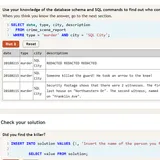
SQL Detective Mystery is a crime story where the only way to question suspects is to write database queries. Someone was killed in SQL City on January 15, 2018, and your one clue is that you remember reading the crime scene report. Everything else lives in tables. It is a smart, hands-on way to practice SQL, and it runs fully in your browser with nothing to install.
The Goal
Name the murderer, then uncover the person who hired them. To get there, you pull facts out of a real SQLite database with about 10,000 people, 1,228 crime scene reports, and thousands of interviews, driver’s licenses and gym check-ins. A built-in checker tells you when you have the right name.
How a Round Plays Out
- Start with the first two code boxes. One lists the tables, and the other shows the columns of a table.
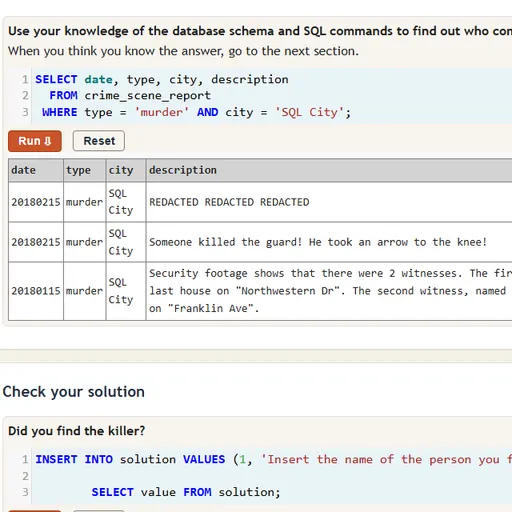
- Query the crime scene reports, filtering by date, type and city, until you find the right one.
- Read who the witnesses were. Look them up in the person table and pull their interview statements.
- Follow each lead, such as a gym badge, a car plate or a check-in date, into the matching table.
- When you have a name, run it through the “Check your solution” box.
- A wrong guess asks you to try again. A right one unlocks the harder follow-up question.
Results appear as a table under each box, and Reset puts a box back to its starting query.
Keys and Buttons for SQL Detective Mystery
| What you do | ⌨ Keyboard | 🖱 Mouse | 👆 Touch |
|---|---|---|---|
| Type or edit a query | Type in the code box | Click inside a code box | Tap a code box to bring up the keyboard |
| Run the query in a box | Shift + Enter | Click Run | Tap Run |
| Put the box back to its starting query | — | Click Reset | Tap Reset |
| Show the database diagram | — | Click the "click here" link above the last code box | Tap the "click here" link |
| Reveal a suggested query (walkthrough page) | — | Click Show Solution | Tap Show Solution |
Winning Strategies
- Open the schema diagram. It shows how tables link through ID columns, which tells you what you can join.
- Filter hard and early. A WHERE clause on several columns cuts a huge table down to a handful of rows.
- Search loosely for names. Use LIKE with % wildcards when a witness gives only part of a name.
- Sort to find the “last” or “first”. ORDER BY with DESC and LIMIT 1 quickly finds things like the last house on a street.
- Join instead of copying. One query that joins license, person and gym data can check several clues at once.
Common Mistakes
- Typing a date in the wrong format. Check how the table stores dates before you filter.
- Forgetting quotes around text values in a WHERE clause.
- Losing clues on reload, since nothing is saved.
Who Should Play It
This is perfect for students, analysts and curious players who want to learn or sharpen SQL with a real goal in front of them. If you like detective stories or coding puzzles, it is a natural fit.
Played and checked by the KBHX Games team · updated