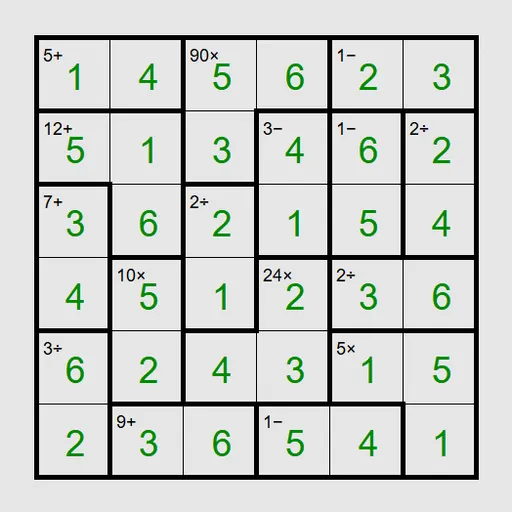
Math Cage Grid combines a no-repeat number grid with quick mental arithmetic. Bold lines split the board into cages, and each cage shows a target with an operation, such as 12× or 7+. You place digits so that every cage reaches its target and no row or column repeats a number. It is the puzzle known as Keen from Simon Tatham’s collection, and every board has one answer you can reach by logic.
The Goal
On a 6x6 board, each row and column holds 1 through 6 exactly once. At the same time, every cage’s digits must combine to its target using the operation shown. The grid flashes when everything is right.
Rules Explained
- Addition and multiplication cages can be any size. Their digits must sum or multiply to the target.
- Subtraction and division appear only on two-square cages. The larger digit minus or divided by the smaller gives the target.
- One-square cages simply give you the digit.
- Repeats inside a cage are fine, provided they are in different rows and columns.
Select a square and type a digit, or right-click first to jot pencil marks. Presets go from a gentle 4x4 to a 6x6 Unreasonable setting that needs trial and error, plus a 9x9 board. Custom lets you pick any size from 3 to 9 and switch to multiplication-only cages.
Keys and Buttons for Math Cage Grid
| What you do | ⌨ Keyboard | 🖱 Mouse | 👆 Touch |
|---|---|---|---|
| Enter a digit | Arrow keys to move, then type the digit | Click a square, then type a digit | Tap a square, then tap a digit button |
| Add or remove a pencil mark | Enter switches the cursor to pencil mode, then type a digit | Right-click a square, then type a digit | Set Tap to Pencil mark (or press and hold a square), then tap a digit |
| Clear a square | Space, Backspace or 0 | — | Tap the square, then Clear |
| Fill every empty square with all pencil marks | M | — | — |
| New game, undo, redo | N, U, R | Menu buttons above the grid | Menu buttons above the grid |
Winning Strategies
- Fill single cages first. They are free answers that ripple into rows and columns.
- Know the tight pairs. On 6x6, a 5- cage must be 1 and 6, 11+ must be 5 and 6, and 3+ must be 1 and 2.
- Factor large products. A product containing 5 forces a 5 into the cage on any board smaller than 10x10.
- Use row totals. Each 6x6 row sums to 21. If whole cages cover all but one square, subtract to find it.
- Let the game fill notes. Press M to place every pencil mark, then strike the ones each cage rules out.
Handy Details
- Undo, redo and Solve are always available from the menu.
- Multiplication-only mode removes the easy sums, so it leans hard on factoring.
Who Should Play It
This puzzle is ideal for players who enjoy numbers and want logic with a math flavor. If you like digit-placement grids or quick arithmetic drills, it blends both into a steady, satisfying challenge.
Played and checked by the KBHX Games team · updated