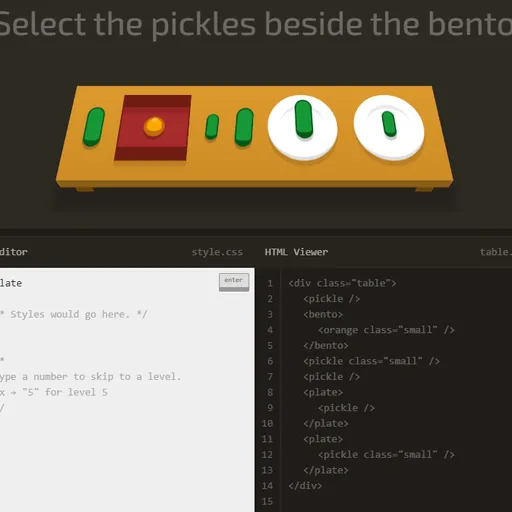
CSS Diner is a playful way to learn CSS selectors, the patterns that tell a stylesheet which elements to style. Each level sets a table with plates, bento boxes, apples, oranges and pickles, then gives an order like “Select the small apples.” You answer by typing a selector. The table is built from real HTML, so your rule is tested against actual elements and you see the result at once.
What Is CSS Diner?
It is a 32-level tutorial in game form. Every level focuses on one selector type, and the items you need to target bounce on the table. Below the table, an HTML Viewer shows the markup, and a side panel explains the selector of the day with examples. Clearing level 32 finishes the game.
How a Round Plays Out
- Read the order and watch which items bounce.
- Check the HTML Viewer to see the tags, classes and IDs involved.
- Type a selector in the CSS Editor and press Enter.
- If it picks exactly the right items, they fly off the plate and the next level loads.
- If it picks too many, too few or none, the editor shakes and you try again with no penalty.
The levels climb in a steady order. You begin with element names, IDs and classes. Then come descendants, commas and the universal selector, followed by the sibling and child combinators. Later levels cover pseudo-classes such as first-child, nth-child, only-of-type, empty and not, and the final stretch is attribute selectors.
Keys and Buttons for CSS Diner
| What you do | ⌨ Keyboard | 🖱 Mouse |
|---|---|---|
| Type a selector | Type in the CSS Editor box | — |
| Check your answer | Enter | Click the "enter" button |
| Jump to a level | Type the level number, then Enter | Open the menu (top right) and click a level |
| See an item's HTML | — | Hover over an item on the table or a line in the HTML Viewer |
| Previous or next level | — | Click the arrows beside the level title |
| Close the level menu | Esc | — |
Winning Strategies
- Read the markup, not just the order. The HTML Viewer shows exactly which names you can target.
- Hover to connect items and code. Pointing at a dish highlights its line of HTML, and the reverse works too.
- Count from 1 in nth selectors. The third child is nth-child(3), not nth-child(2).
- Watch the space. A space matches anything nested inside, while the greater-than sign matches only direct children.
- Borrow from the examples. The help panel shows a working pattern you can adapt.
Handy Details
- Type a level number and press Enter to jump straight to it.
- The layout is made for wide screens, and hover tips need a mouse, so a computer works best.
Who Should Play It
CSS Diner is ideal for new web developers, students and designers who want selectors to finally click. If you like coding puzzles or other learn-by-doing tutorials, it turns dry syntax into short, satisfying challenges.
Played and checked by the KBHX Games team · updated