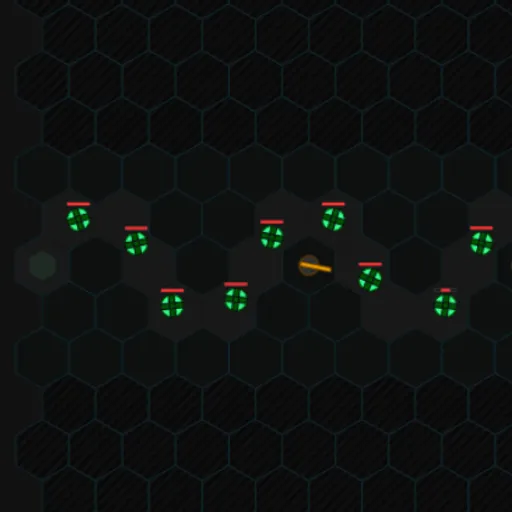
Hex Formation is a compact tower defense game built on a grid of six-sided cells. Spinning green enemies roll along a twisting gray path, and you place turrets beside it to stop them. With only ten lives and ten waves, every build choice matters. Mason Blier made the game, and its short runs make it easy to learn and replay.
The Goal
Destroy enemies before they reach the exit. Each one that slips through costs a life, and losing all ten ends the run. Clear all ten waves to win and earn a score. Three maps are available: alternating, zig-zag and loopback.
How a Round Plays Out
- Choose a map. You start with 100 cash and 10 lives.
- Pick a tower in the side panel: Standard, Rapid Fire or Laser Beam.
- Click a solid dark cell next to the path to build it.
- Press Start Game. Enemies roll out two per second.
- Each kill pays cash equal to twice the enemy’s starting health.
- Use that cash to build more towers, or select a tower to upgrade or sell it.
- Press Next Wave to call the next group early if you feel ready.
Keys and Buttons for Hex Formation
| What you do | 🖱 Mouse | 👆 Touch |
|---|---|---|
| Choose a tower type to build | Click Standard, Rapid Fire or Laser Beam in the side panel | Tap a tower type in the side panel |
| Build the chosen tower | Click an empty dark hexagon next to the path | Tap an empty dark hexagon |
| Select a built tower (shows its range) | Click the tower | Tap the tower |
| Upgrade or sell the selected tower | Click "Upgrade" or "Sell" | Tap "Upgrade" or "Sell" |
| Start the first wave, or call the next one early | Click "Start Game", then "Next Wave" | Tap "Start Game", then "Next Wave" |
| Pause, resume or quit | Click "Pause", "Resume" or "End Game" | Tap the same buttons |
Winning Strategies
- Build on bends. A hexagon at a curve can touch the path on several sides and fire longer.
- Mix tower types. Different towers cover different needs, so test each one as waves get tougher.
- Upgrade instead of spreading thin. A few strong towers often beat many weak ones.
- Protect your lives. Each remaining life adds far more to the final score than cash.
- Check tower range. Click a tower to see its reach before deciding where to place the next.
Common Mistakes
- Clicking a built tower and then wondering why new towers will not place. Pick a tower type again first.
- Trying to build on the gray path or the striped border cells.
- Calling waves early before your defense is ready.
Who Should Play It
This game is a good fit for strategy players who enjoy short, focused defense battles. If you like lane-defense games or grid-based planning, the hex layout adds a fresh angle.
Played and checked by the KBHX Games team · updated