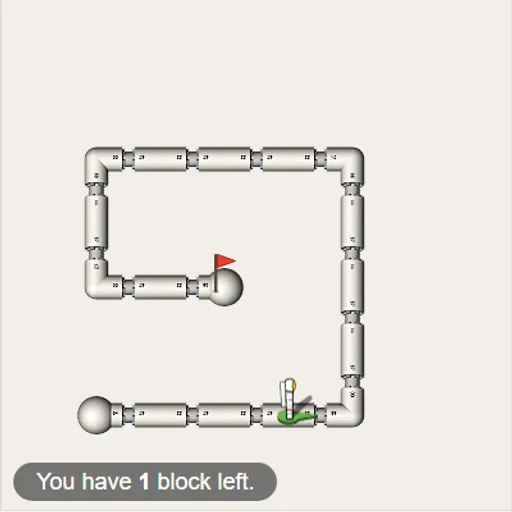
Block Code Maze is a beginner coding puzzle where you write programs by snapping blocks together. An astronaut stands in a maze of white pipes, and a red flag marks the exit. You never steer the astronaut by hand. You plan the whole route ahead of time, press Run and watch to see if your plan was right. It is a calm, clear way to learn how programs think.
The Goal
Get the astronaut to the flag using only the blocks you place. There are ten levels. Each one brings in a new idea, starting with plain steps and ending with a maze the program has to solve on its own.
How a Round Plays Out
The maze is on the left. On the right is a gray toolbox and a white workspace. Drag blocks into the workspace and drop them under each other until they snap together. The stack runs from top to bottom.
Press Run Program, and the astronaut carries out one block at a time. If it reaches the flag, you get a win message with the matching JavaScript, then OK sends you on. If it hits a wall or stops early, press Reset and rework the stack.
The first mazes use only move forward and turn. Next comes repeat until, which lets one loop do the work of many blocks. Later levels add if path and if-else checks, so the astronaut can react to openings. Many mazes also limit how many blocks you may use.
Keys and Buttons for Block Code Maze
| What you do | 🖱 Mouse | 👆 Touch |
|---|---|---|
| Add a block to your program | Drag it from the gray toolbox into the white workspace | Drag it with your finger |
| Join blocks | Drop a block just under or inside another until it clicks in place | Drop it under or inside another block |
| Remove a block | Drag it onto the trash can or back to the toolbox | Drag it onto the trash can |
| Change a direction in a block | Click the small drop-down arrow on the block | Tap the drop-down arrow |
| Run or stop the program | Click Run Program, then Reset | Tap Run Program, then Reset |
| Jump to another level | Click a dot or number at the top | Tap a dot or number |
Winning Strategies
- Plan the route before building. Count the steps and the turns on screen first.
- Spot the repeating chunk. If the path keeps going “forward, then turn”, put that pair in a loop.
- Read the block limit as a clue. A tight budget means the maze wants a loop or an if check.
- Think from the astronaut’s view. Left and right depend on where it faces, not on your screen.
- Hug one wall on the last mazes. Keep going forward and turn whenever a side path opens up.
Common Mistakes
- Mixing up your left with the astronaut’s left when it faces down.
- Building a long chain of single steps when a loop would fit the budget.
- Putting a turn outside the loop when it needs to be inside.
Who Should Play It
It is ideal for kids and adults trying programming for the first time, and for anyone who likes step-by-step logic puzzles. If you like path-planning puzzles or robot-instruction games, this will click quickly.
Played and checked by the KBHX Games team · updated