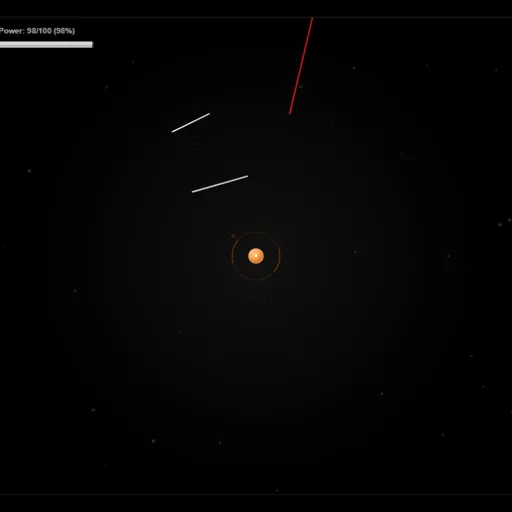
SpacePi is a small arcade defense game where your pointer is the only weapon. A tiny orange base sits in the middle of space, red streaks shoot toward it from every side, and you sketch white barriers to cut them off. It was made by Jack Rugile for the js13kGames contest, so the whole thing is drawn in code and loads in a blink. Short levels and a clear upgrade path make it easy to play one more round.
The Goal
Each level asks you to grow your base to a target size. The base expands on its own over time, and a Completion bar at the top shows how close you are. Red streaks that get through bite pieces off it. If the base shrinks to almost nothing, you lose the level. Hit the target size and you win, which unlocks the next of the 13 levels.
How a Round Plays Out
- Press Play Game and choose an open level from the row at the bottom of the upgrade screen.
- Watch the edges. Red streaks fly in, faster and harder-hitting in later levels.
- Drag to draw a line across a streak’s path. When they cross, both burst apart.
- Every line drains power equal to its length. The Power bar starts at 100 and slowly refills.
- Broken streaks may drop coins or a power-up. Move your pointer near them to pull them in.
- Between levels, spend coins on ten upgrade tracks, each with five steps.
Power-ups can slow enemies, give you unlimited power for a while, double base growth, or spray coins across the field.
Keys and Buttons for SpacePi
| What you do | ⌨ Keyboard | 🖱 Mouse | 👆 Touch |
|---|---|---|---|
| Draw a defensive line | — | Click and drag | Drag a finger |
| Pull in coins and power-ups | — | Move the pointer near them | Touch near them |
| Pause or resume | Space | — | — |
| Buy upgrades and pick levels | — | Click the buttons | Tap the buttons |
Winning Strategies
- Draw small and close. A short line right in front of a streak blocks it and costs very little power.
- Protect the opening seconds. The base is tiny at the start, so one early hit can sink the run.
- Collect between waves. The magnet pulls drops toward your pointer, not the base, so sweep across the field in quiet moments.
- Buy power upgrades early. Power Capacity and Power Generation let you keep drawing during busy stretches.
- Farm a cleared level. If you need more coins, replay an easy level for a safe payout.
Common Mistakes
- Drawing long sweeping lines that drain your Power bar right before a big wave.
- Forgetting that every line adds 100 points to a score where lower is better.
- Chasing coins near the edge while a streak slips in from the other side.
Who Should Play It
SpacePi fits players who like quick reflex games with light progression and a score to beat. If you enjoy tower defense or mouse-driven arcade games, give it a few levels.
Played and checked by the KBHX Games team · updated