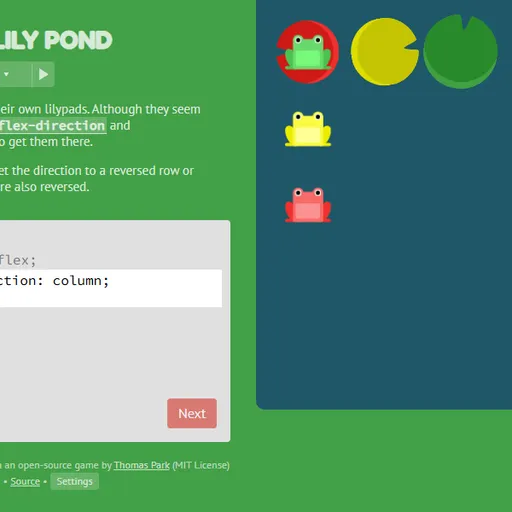
Flexbox Lily Pond is a friendly way to learn CSS flexbox, using a pond and a few colorful frogs. Each green, yellow or red frog wants to sit on the lily pad that shares its color. You guide them with genuine CSS written for the pond element, exactly what you would use to arrange a real web page. The frogs hop around the instant you type, so you see what every property does.
What Is Flexbox Lily Pond?
It is a 24-stage tutorial dressed up as a puzzle. On each stage you get a brief explanation, an editor and the pond. The editor already turns flex layout on, and your job is to write the rest. When every frog rests on a pad of its own color, Next becomes clickable.
How a Round Plays Out
- Read the explanation and note where the pads sit.
- Type the declarations that are missing. The pond updates live.
- Early stages shift frogs sideways with justify-content and vertically with align-items.
- Then flex-direction flips the layout into a column or reverses it, which also swaps the meaning of start and end.
- Later stages move one frog using order or align-self, split frogs over several lines with flex-wrap or flex-flow, and spread those lines with align-content.
- Some stages combine two or three of these at once.
Progress and your typed code stay in the browser, and finished stages are marked in the menu.
Keys and Buttons for Flexbox Lily Pond
| What you do | ⌨ Keyboard | 🖱 Mouse | 👆 Touch |
|---|---|---|---|
| Type CSS | Type in the code box | — | Tap the code box and use the on-screen keyboard |
| Submit a correct answer | Enter on the last line, or Ctrl + Enter | Click "Next" once it lights up | Tap "Next" |
| Pick a level | — | Click the level counter, then a level number, or use the side arrows | Tap the level counter, then a level number |
| Read about a property | — | Click a highlighted property name in the instructions | Tap a highlighted property name |
| Change difficulty or colorblind mode | — | Click "Settings" under the editor | Tap "Settings" |
Winning Strategies
- Know your main axis. Justify-content follows flex-direction, so in a column it moves frogs up and down.
- Click the highlighted words. They list every value a property allows.
- Expect reversed sides. With a reverse direction, flex-start lands on the opposite edge.
- Touch only the target frog. Single-frog stages give you a selector for one color.
- Separate the two aligns. One aligns frogs inside a line; the other spaces whole lines apart.
Handy Details
- Settings include a colorblind mode.
- On phones the editor sits above the pond, and you type with the on-screen keyboard.
Who Should Play It
Flexbox Lily Pond is a great choice for beginning web developers, students and designers who want flexbox to finally make sense. If you like coding puzzles or visual layout tutorials, it is an easygoing way to practice.
Played and checked by the KBHX Games team · updated