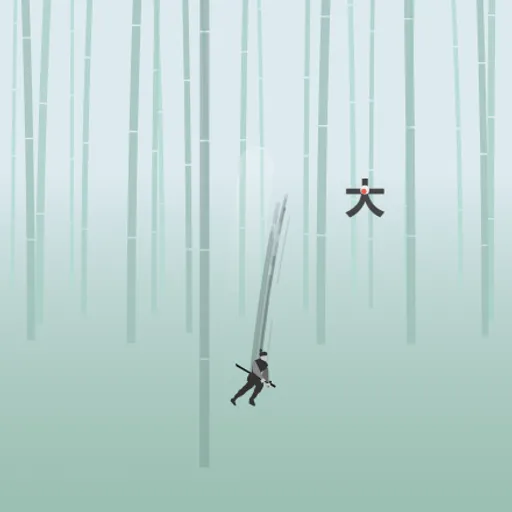
Stolen Sword is a graceful action game you play with one finger or one mouse button. A swordsman is chasing the thief who took his blade, and he moves only by flinging himself through the air. You pull back, aim along a dotted arc, and let go to slash through enemies. Time nearly freezes while you aim, which makes each strike feel calm and planned. Ian Chiao made it for js13kGames 2020, and every scene is drawn in code.
What Is Stolen Sword?
It is a short, story-driven chase across four stages, from a bamboo forest to swaying bamboo platforms and still lakes. Enemies appear as dark symbols with a red dot. Red shapes are hazards that hurt you on contact. Your goal is to clear each wave of enemies and push on until the chase ends.
How a Round Plays Out
- Click or tap once the title fades in. Your swordsman runs in and the first foe appears.
- Press anywhere and drag in the opposite direction of where you want to fly, much like a slingshot.
- A dotted line shows your path, bent by gravity. Time slows while you hold.
- Let go to dash. If the path crosses an enemy, your blade cuts it.
- You have two dashes from the ground, and each hit gives you at least one back.
- Short story captions show up between stages. Click or tap to continue.
Later foes fire rings of red squares, some heal over time, and some are linked to a core that controls the group.
Keys and Buttons for Stolen Sword
| What you do | 🖱 Mouse | 👆 Touch |
|---|---|---|
| Start the game | Click once the title appears | Tap once the title appears |
| Aim a dash (time slows while you aim) | Press and drag away from where you want to go | Touch and drag away from where you want to go |
| Dash and slash | Release the button | Lift your finger |
| Continue after a story caption | Click | Tap |
Winning Strategies
- Start with short pulls. A long drag dashes farther, but a short one is easier to place near the ground.
- Plan the next target first. Since hits refill a dash, line up your next enemy before you release.
- Take your time while aiming. The world nearly stops, so watch where shots are flying before you commit.
- Strike guards from a safe side. Pick an angle where the bounce won’t throw you into a hazard.
- Go for the core. When enemies are linked, destroying the center piece removes the whole group.
- Use the water. In the lake stages, a quick splash refills your dashes.
Handy Details
- The game plays best with a phone held upright, because the field is tall and narrow.
- Your first visit shows a moving hint that explains the drag.
Who Should Play It
Stolen Sword suits players who like precise, unhurried action and short sessions. If you enjoy one-touch arcade games or slingshot aiming games, you will like its rhythm.
Played and checked by the KBHX Games team · updated