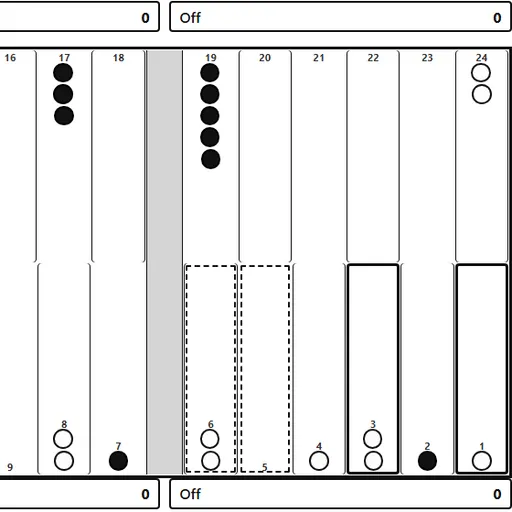
Backgammon blends luck and judgment in a way few board games manage. The dice tell you how far to move, but you choose which checkers go where, and those choices add up over a game. This browser version follows the complete rules and lets you face a computer at three strengths or a friend on one screen.
The Goal
Each player owns 15 checkers and moves them in opposite directions around a board of 24 points. You want to bring every one of your checkers into your home board and then remove them, called bearing off. The first player to bear off all 15 wins the game.
Rules Explained
Black moves first. Roll two dice and move by each number separately, with one checker or two. A double gives four moves.
A point held by two or more enemy checkers is blocked. A point with just one enemy checker is open, and landing there hits it and sends it to the bar. A checker on the bar must re-enter through the opposing home board before anything else moves.
You must use both dice if you can. If only one can be played, the larger one is required. With no legal move, your turn is skipped.
Once all 15 checkers are home, use “Off” to bear them off. A plain win is worth 1 point. A gammon is worth 2 when the loser has borne off nothing, and a backgammon is worth 3 if the loser also has a checker on the bar or in your home board. The cube multiplies these values.
Keys and Buttons for Backgammon
| What you do | ⌨ Keyboard | 🖱 Mouse | 👆 Touch |
|---|---|---|---|
| Roll the dice | Tab to "Roll dice", then Enter | Click "Roll dice" | Tap "Roll dice" |
| Move a checker | Arrow keys to a point, Enter, then arrow to the target and Enter | Click a point with your checker (or the Bar), then the target point | Tap a point with your checker (or the Bar), then the target point |
| Bear off | — | Select the checker, then click "Off" | Select the checker, then tap "Off" |
| Offer a double before rolling | — | Click "Double" | Tap "Double" |
| Undo, resign or show the move list | — | Click "Undo", "Resign" or "Moves" | Tap "Undo", "Resign" or "Moves" |
| Set up a new game | — | Open "Menu", choose "2 Player (local)" or "vs Computer", then "New game" | Open "Menu", choose "2 Player (local)" or "vs Computer", then "New game" |
Winning Strategies
- Check the pip count each turn. It shows who leads the race.
- Cover your blots. A single checker within six points of an enemy is easy to hit with one die.
- Make points side by side. A row of held points forms a block that a trapped enemy checker cannot easily get past.
- Double from a strong lead. If the computer is far behind on pips, it refuses, and you take the current stake right away.
- Move up a level once you win often. Hard leaves fewer open checkers, so it teaches safer play.
Handy Details
- Undo lets you take back a move before you finish your turn, and the Moves list shows the game so far.
- Every button and point works with a tap, so it plays well on phones and tablets.
Who Should Play It
This is for anyone who enjoys classic board games where planning matters as much as the roll. If you like dice games, race games or calm two-player strategy at a table, it is a strong choice.
Played and checked by the KBHX Games team · updated