Warden’s Duty is a compact roguelike where the real enemy is your own budget. You run a crowded prison packed with goblins, rats, dragons and stranger things, and you must empty every cell. There is no wandering around a dungeon. Each cell is one decision about how to handle whatever is inside. Ondřej Žára made it for the 2015 Seven Day Roguelike Challenge, and it rewards careful math over fast fingers.
What Is Warden’s Duty?
It is a turn-based game drawn in text characters. Each floor is a grid of cells, shown on a small map in the corner. Your job is to clear all of them, then head down to the next, larger floor. You keep going until nothing left on a floor is something you can afford to deal with.
How a Round Plays Out
- Move into a neighboring cell with the arrows, WASD or HJKL.
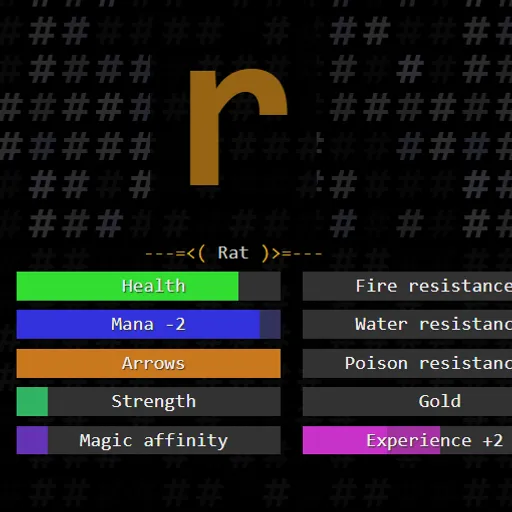
- The creature or object inside fills the screen, with a list of possible actions below.
- Choices usually include a melee attack, a magic missile and a bow shot.
- Press a number key to preview an action. Colored bars show exactly how it will change your health, mana, arrows, gold and experience.
- Press Enter to commit.
- Melee costs health, magic costs mana, and bow shots use one or two arrows. Strength lowers melee damage taken, and magic affinity lowers spell costs.
- Kills give experience. A full bar levels you up, boosts stats and fully restores you.
Some cells hold treasure chests, traps, magic pools or shopkeepers instead of monsters.
Keys and Buttons for Warden's Duty
| What you do | ⌨ Keyboard |
|---|---|
| Start the game, confirm the selected action, play again after game over | Enter |
| Move to a neighboring cell | Arrow keys, W A S D, or H J K L |
| Choose an action in the current cell | Number keys 1 to 9 |
Winning Strategies
- Compare every option. The preview is exact, so check all actions before defaulting to melee.
- Scout the floor first. Look at each cell, then save mana or arrows for the hardest fight.
- Time your level ups. Since leveling restores everything, take an expensive fight right before your experience bar fills.
- Hold some gold back. Shops on certain floors sell arrows, potions and training.
- Aim elemental breaths well. A breath left by an elemental creature works best on a foe of a different element.
- Ignore risky cells. Chests may be trapped and pools may hurt you, but Ignore still clears the cell.
Common Mistakes
- Spending health on weak foes early and having none left for tough ones.
- Using up all arrows on the first floor.
Who Should Play It
Warden’s Duty fits players who enjoy resource puzzles, careful planning and turn-based pacing. If you like deckbuilding-style roguelikes or old-school text dungeon games, give it a run.
Played and checked by the KBHX Games team · updated