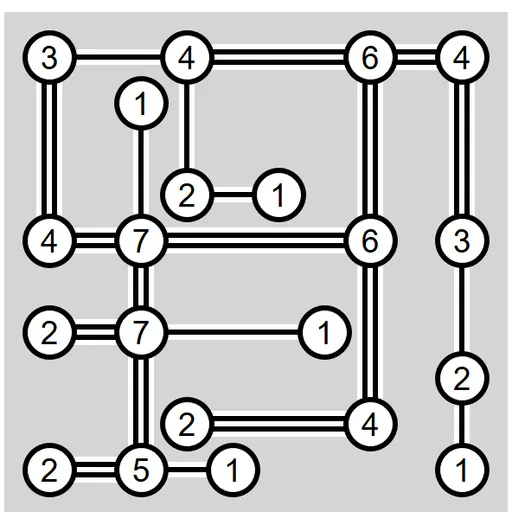
Bridges Island Puzzle is a pure logic game about joining numbered circles with lines. Each island tells you how many bridges must touch it, and your task is to meet every number while keeping the map in one piece. There is no timer and no luck involved. James Harvey wrote it for Simon Tatham’s Portable Puzzle Collection.
The Goal
Finish the map so three things hold at once. Every island has exactly as many bridges as its number. No two bridges cross. And you can travel from any island to any other along the bridges. When all of that is true, the board flashes to show you solved it.
Rules Explained
- Bridges go only in straight lines, across or up and down. Diagonals are not allowed.
- A bridge has to run to the nearest island in that direction and may not cross another bridge.
- Between two islands you can place one bridge or a double. A double counts as two for both ends.
- Drag or use the keys once for a single bridge, again for a double, and a third time to clear it.
- If a mistake is certain, such as too many bridges or a group cut off from the rest, the islands turn red.
- Loops are fine under the standard rules. Custom settings can ban them.
Keys and Buttons for Bridges Island Puzzle
| What you do | ⌨ Keyboard | 🖱 Mouse | 👆 Touch |
|---|---|---|---|
| Build a bridge (repeat for a double, again to remove) | Ctrl + arrow, or Enter then an arrow | Drag from an island toward its neighbor | Drag from an island toward its neighbor |
| Mark two islands as not linked | Shift + arrow | Right-drag between islands | Press and hold an island, then drag |
| Mark an island as finished | Space, or Enter twice | Left-click the island | Tap the island |
| Jump to an island with a given number / show possible links | Number keys / G | — | — |
| New game, undo, redo | N, U, R | Menu buttons above the map | Menu buttons above the map |
Winning Strategies
- Find the forced moves first. An island whose number equals twice its neighbor count must take a double to every neighbor. A 4 in a corner is the classic case.
- Spot islands with only one neighbor. They have no choice, so fill them in and move on.
- Avoid sealed pairs. Linking two 1s, or two 2s with a double, closes them off. That can only be right if they are the last two islands.
- Use non-link marks. When you prove two islands cannot connect, mark it so you do not try that route again.
- Press G to see options. Grey lines appear for every link still possible, which makes blocked paths easy to read.
- Lock what you know. Click a finished island so a stray drag cannot change it.
Handy Details
The Type menu has 7x7, 10x10 and 15x15 boards, each at easy, medium or hard. Undo and redo are always available, so experiments cost you nothing. The layout fits upright phone screens as well as desktop windows.
Who Should Play It
Players who like number grids and slow, careful thinking will get the most from it. If you enjoy grid-based logic puzzles or path-connecting brain teasers, add this to your list.
Played and checked by the KBHX Games team · updated