Block Code Music is a coding puzzle where your program makes a song instead of moving a character. You place note blocks, press Run and hear the result right away. Over ten levels, one old children’s round teaches a key idea in programming, the function. You write a phrase once, give it a name and use it as often as you need.
The Goal
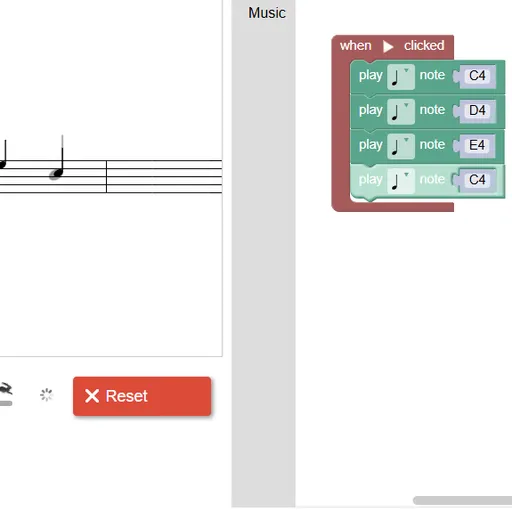
Match the target melody shown on the staff. Notes you still need appear in gray. As your program plays, the correct ones are drawn in black. If you hit every note, you pass and see the JavaScript that matches your blocks.
How a Round Plays Out
Each program starts with a “when Run clicked” block. Drop “play note” blocks inside it, then set the pitch and length on each one. Press Run Program to hear it, and Reset to stop.
The levels build in a clear order:
- Play the first four notes of the tune.
- Play those notes twice without adding more note blocks, which means using a function.
- Add functions for the next phrases until the song is complete.
- Swap sounds with the set-instrument block, and add silence with rests.
- Use several start blocks at once, each delayed, to stack voices into a round.
Level 10 drops the target, and you can compose whatever you like.
Keys and Buttons for Block Code Music
| What you do | ⌨ Keyboard | 🖱 Mouse | 👆 Touch |
|---|---|---|---|
| Add note, rest or function blocks | — | Click the Music category and drag a block into the workspace | Tap the category and drag a block |
| Choose a pitch | Type a note name such as D4 and press Enter | Click the note name and pick a line on the small staff | Tap the note name and pick a line |
| Choose a note length | — | Click the note symbol on the block | Tap the note symbol |
| Play or stop your tune | — | Click Run Program, then Reset | Tap Run Program, then Reset |
| Change playback speed | — | Drag the tempo slider | Slide the tempo control |
Winning Strategies
- Give functions clear names. Labels like “part one” keep a long tune easy to follow.
- Watch for gray notes. Any gray note left after a run is one you missed or got wrong.
- Fix length, not count. When one phrase ends on a held note, make that note longer instead of adding a second block.
- Offset each voice with rests. In the round levels, each new part enters a little later than the last one.
- Slow the tempo to debug. Drag the slider down to hear exactly where a note goes wrong.
Handy Details
Nothing plays until you press Run Program, so the game won’t surprise you with sound. Different instruments in each start block make the round parts easier to tell apart. The JavaScript shown after a win is a useful look at real code.
Who Should Play It
It fits young coders and music lovers who want a gentle, hands-on look at functions. Players who enjoy rhythm toys or step-by-step logic puzzles will like how the song comes together.
Played and checked by the KBHX Games team · updated