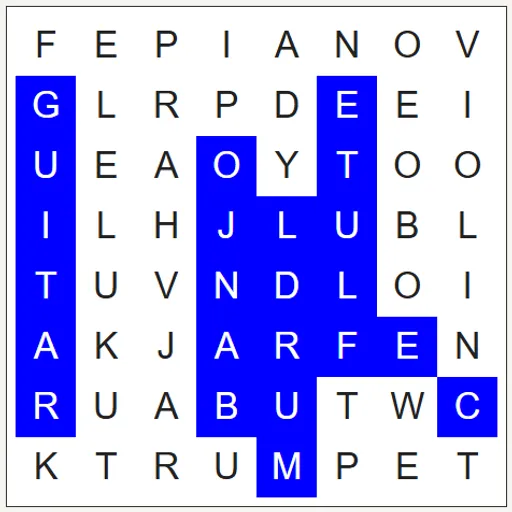
Word Search is the relaxing letter-hunting puzzle that almost everyone knows. A square grid hides twelve words, and you sweep across the letters to find them. This version comes with seven themed lists and also lets you type in your own words, so it works for spelling practice, classroom lessons or just a quiet break.
What Is Word Search?
It is a puzzle where words are hidden in straight lines inside a grid of random letters. Each word can run in any of eight directions, forward, backward, up, down or diagonally. The themes are Animals, Kitchen, Weather, Space, Fruit, Music and Ocean, with twelve words each. Find them all and the grid turns green.
How a Round Plays Out
- A themed list loads when the page opens.
- Scan the grid for the first letter of a word on the list.
- Press on that letter and drag in a straight line to the last letter, then release.
- A correct word turns blue and gets crossed off. A wrong selection just clears.
- Find all twelve to see the “All words found.” message.
- Press New word list for the next theme, or New grid with these words to reshuffle the current list.
If you get stuck, Solve Puzzle shows the missing words in purple.
Keys and Buttons for Word Search
| What you do | ⌨ Keyboard | 🖱 Mouse | 👆 Touch |
|---|---|---|---|
| Select a word | — | Press on the first letter and drag to the last | Touch the first letter and slide to the last |
| Switch to the next themed word list | — | Click "New word list" | Tap "New word list" |
| Make a new grid from the words shown | — | Click "New grid with these words" | Tap "New grid with these words" |
| Add or change a word | Type in a word box | Click "Add word" for an extra box | Tap "Add word" for an extra box |
| Reveal the remaining words | — | Click "Solve Puzzle" | Tap "Solve Puzzle" |
Winning Strategies
- Look for rare letters. The filler letters never include Q, X or Z, so spotting one means you’ve found part of a word.
- Find the longest word first. The grid starts as wide as the longest word, so it often spans a full row, column or diagonal.
- Search backward too. If a first letter leads nowhere, look for the last letter and read in reverse.
- Trust the trail. The orange highlight stops as soon as you leave every word’s path, telling you to change direction.
- Check crossings. Words often share letters, so a found word is a good place to look for the next.
Handy Details
- On narrow screens, the grid moves above the word list and shrinks to fit.
- Custom lists can be any length, and the grid grows to fit every word.
- Playing with a finger works just like a mouse drag.
Who Should Play It
Word Search is perfect for kids building vocabulary, teachers making quick activities, and anyone who wants a gentle, low-stress puzzle. If you like crosswords or other word games, it is a comfortable pick.
Played and checked by the KBHX Games team · updated