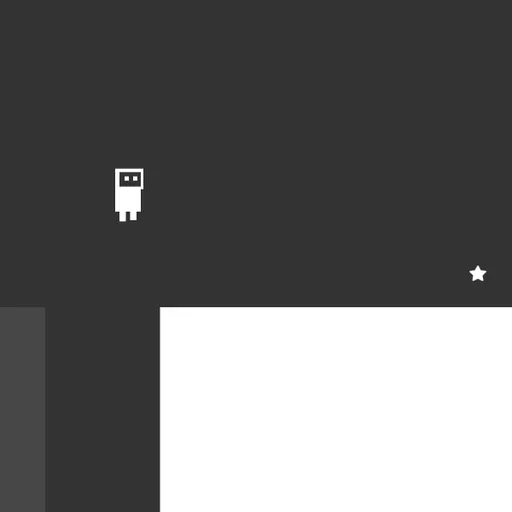
OnOff is a two-color puzzle platformer starring a small robot in a world split into two layers. Some blocks belong to the dark layer and some to the light one, and only one is solid at any moment. A single key flips them, often in the middle of a jump. Daniel Marino and Brad Dunbar built it for the 2018 js13k contest, with sharp vector graphics and a bright soundtrack.
The Goal
Reach the star on each screen to clear it. The next level loads right away, and a congrats screen waits after level 25. A star counter tracks levels cleared and a skull counter tracks every crash.
How a Round Plays Out
Walk and jump toward the star. Blocks of the active layer are solid, while the other layer appears as a faint outline you can pass through. Press Space to swap them.
Every puzzle revolves around that swap. When a pit looks too wide, check the ghost layer for a ledge. When a barrier stands in front of you, see whether it belongs to the color you can turn off.
Your robot breaks apart if it falls off the bottom, touches spikes on the active layer or ends up inside a block that turns solid. A short burst plays and the current level restarts. Attempts are unlimited.
The title menu also has a level editor with a help panel. P adds a platform, S plus a direction adds spikes and G lets you test the stage right away.
Keys and Buttons for OnOff
| What you do | ⌨ Keyboard | 🖱 Mouse |
|---|---|---|
| Move left or right | A / D or Left / Right arrows | — |
| Jump | W or Up arrow | — |
| Switch platform layer | Space | — |
| Pick a menu item | Up / Down arrows, then Enter | — |
| Leave a custom level | Escape | — |
| Place and edit pieces in the editor | P adds a platform, S + U/D/L/R adds spikes, G tests the level | Drag to move or resize, double-click to change layer, Shift + click to delete |
Winning Strategies
- Leave the ground before flipping. Mid-air is usually the safest moment, since your robot rarely overlaps a block up there.
- Trace a route on paper in your head. Look at the ghost outlines and decide in advance where each swap will happen.
- Fall on purpose. A level with stacked floors often wants you to make the current floor vanish, drop, then swap back to catch the next one.
- Turn hazards off. A row of spikes only hurts while its color is active, so swapping can make it a safe walkway.
- Take off late. Your hop has a fixed height and short reach, so leave from the very lip of a ledge.
Common Mistakes
- Pressing Space while standing where the other layer has a block.
- Jumping early and falling short of a gap.
- Ignoring the outline layer until you are already stuck.
Who Should Play It
OnOff is made for players who like puzzles that also test timing. If you enjoy precision platformers or switch-based logic games, its 25 levels offer a steady, fair climb.
Played and checked by the KBHX Games team · updated