Elevator Saga is a coding game in which you never ride or press anything yourself. Instead, you write JavaScript that controls when and where each car travels, and you watch little passengers hop on and off as your program runs. Every level has a target to hit, and sloppy logic leaves people waiting in the lobby. It is a hands-on way to practice event-driven code.
The Goal
Hit the target for each level before it fails. Some ask you to deliver a certain number of riders within a time limit. Others limit how many floors your cars may cover, or end the attempt if anyone waits too long. Eighteen levels are graded, and a nineteenth is an open sandbox with no target.
How a Round Plays Out
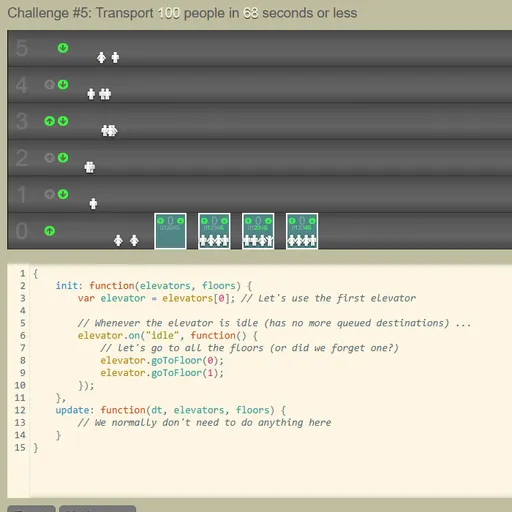
The upper half shows the building, where riders spawn and call for a car. The lower half holds an editor with a basic sample program.
- Your program is an object with an init function, which runs a single time, and an update function, which runs repeatedly.
- In init, hook events onto every car, such as idle, a floor being requested from inside, or arrival at a floor.
- Hook the up and down call events onto every floor as well.
- Inside those handlers, send cars to floors, read how loaded a car is, or rearrange its queue of stops.
- Press Apply to restart with your new code and watch the numbers.
Early levels give you one car and a short building. Later ones add multiple cars of different sizes and up to 21 floors.
Keys and Buttons for Elevator Saga
| What you do | ⌨ Keyboard | 🖱 Mouse |
|---|---|---|
| Type and edit your elevator program | Type in the code editor (Tab inserts four spaces) | Click inside the editor to place the cursor |
| Run your code from the start of the challenge | — | Click "Apply" |
| Start, pause or restart the simulation | — | Click the Start / Pause / Restart button |
| Change simulation speed | — | Click the minus or plus icon next to the speed number |
| Go to the next challenge after a win | — | Click "Next challenge" |
| Save, reset, or bring back code from before a reset | — | Click "Save", "Reset" or "Undo reset" |
Winning Strategies
- Fix the sample first. It only bounces between the two lowest floors, so start by sending cars to requested floors.
- Respond to waiting riders. Use the floor call events so empty cars travel to where people stand.
- Pass by when packed. Check the load before stopping, because a crowded car has no room.
- Match the level’s rule. When travel is limited, gather several riders before moving.
- Speed up the clock. A faster time scale shows quickly whether a plan holds up.
Handy Details
- The editor-heavy layout is built for a computer with a real keyboard.
- An Undo reset button restores your code after an accidental wipe.
Who Should Play It
Elevator Saga is perfect for programmers, students and curious tinkerers who enjoy solving problems with code. If you like coding puzzles or logistics and automation games, it turns an everyday ride into a satisfying design problem.
Played and checked by the KBHX Games team · updated