Fleet Strike is a solo sea battle against the computer. First you tuck five vessels onto your own 10x10 chart, then you and your rival take alternate shots at each other’s unseen waters. Whoever wipes out the other navy first wins. The computer is no random shooter: it tracks the odds of where your vessels might still sit, so every match feels like a real duel.
The Goal
Locate and sink the full rival navy before it does the same to you. A vessel goes down once all of its squares are struck.
How a Round Plays Out
- Choose a vessel from the menu at the side.
- Set it flat or upright using Rotate Ship, then click Your Fleet to drop it in. A ghost outline previews the spot.
- Vessels may not overlap or stick past the border. Once all five are down, hit Start Game.
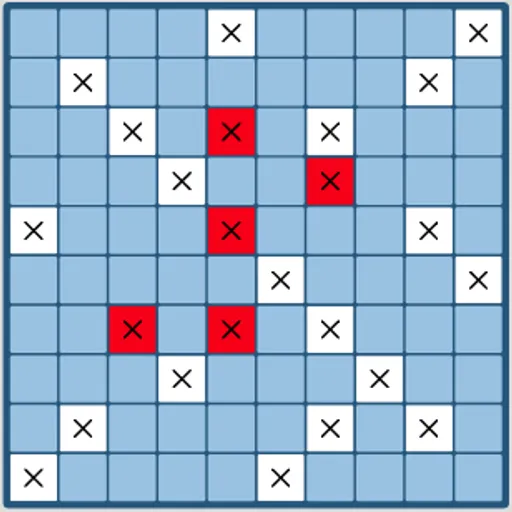
- Click a square on the rival chart to shoot. White with an X means you missed, and red means you struck something.
- After your shot, the computer answers with one of its own, and its marks appear on your chart.
When one navy is gone, a banner names the winner. Restart Game deals out a new match with the rival vessels moved.
Keys and Buttons for Fleet Strike
| What you do | 🖱 Mouse | 👆 Touch |
|---|---|---|
| Pick a ship to place | Click its name in the Place Your Ships list | Tap its name in the list |
| Turn the ship before placing it | Click "Rotate Ship" | Tap "Rotate Ship" |
| Place the ship | Click a square on Your Fleet (a preview shows on hover) | Tap a square on Your Fleet |
| Fire a shot | Click a square on Enemy Fleet | Tap a square on Enemy Fleet |
| Play again after a game ends | Click "Restart Game" | Tap "Restart Game" |
Winning Strategies
- Shoot in alternating squares. The tiniest vessel spans two cells, so a checkerboard pattern still finds all of them.
- Chase each strike. Test the four neighbors, then follow the line after a second strike.
- Avoid the obvious corners. The computer’s opening favors certain corners, so a vessel tucked there may go early.
- Space your vessels out. Ships that touch let one hot streak sink two in a row.
- Vary the layout. Pointing every vessel the same way gives the computer an easy pattern.
Handy Details
- Both charts shrink to fit side by side, so a bigger screen gives larger targets.
- Placing and shooting both work with taps.
Who Should Play It
Fleet Strike is for players who enjoy deduction and odds more than quick reflexes. If you like grid guessing games or turn-based duels against a tough computer, it gives a fair but sharp opponent.
Played and checked by the KBHX Games team · updated