Tiny Synth Piano is a pocket-size music toy that turns your computer keyboard into an instrument. It has 36 keys stacked in three rows, one octave each, with the low notes on the bottom row. Every sound is generated on the spot, so there is no loading and no lag. Frank Force first wrote it as 1Keys, a piano in about one kilobyte of code, and this expanded version adds labels, voices and pitch controls.
What Is Tiny Synth Piano?
It is a free-play instrument, not a challenge. There are no scores, levels or timers. You press keys, hear notes, and experiment with sounds. Four voices are available: an organ tone that is selected at start, brass, strings and a plain sine tone. A Shape menu changes the wave behind every voice to sine, square, sawtooth or triangle.
How a Round Plays Out
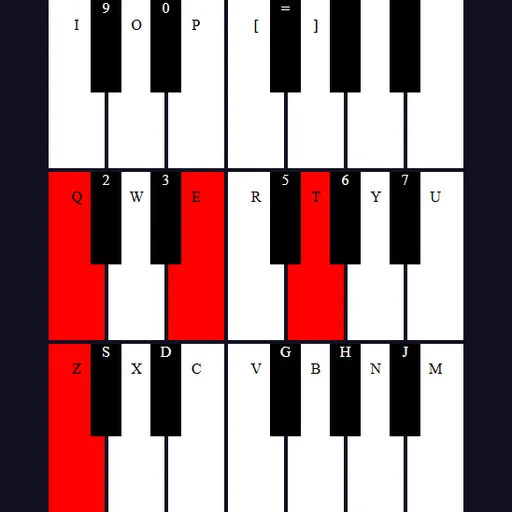
- Press a letter key. Its matching piano key turns red and the note sounds.
- Release it and the note fades over a moment while the key color eases back.
- Use the bottom letter row for the lowest octave. Z is a low C, and keys above it like S and D give the black notes.
- Use the Q row and the number keys above it for the middle octave.
- Continue on the top row with I, O, P and the bracket keys.
- Change the voice, wave shape, octave or key with the controls at the top.
You can also press and drag across keys with the mouse, or touch and hold keys on a touch screen.
Keys and Buttons for Tiny Synth Piano
| What you do | ⌨ Keyboard | 🖱 Mouse | 👆 Touch |
|---|---|---|---|
| Play notes in the lowest octave | Z S X D C V G B H N J M | — | — |
| Play notes in the middle octave | Q 2 W 3 E R 5 T 6 Y 7 U | — | — |
| Play notes in the top octave | I 9 O 0 P [ = ] | — | — |
| Play or hold any key | — | Press and hold on a key, or drag across keys with the button down | Touch and hold a key |
| Change voice, wave shape, octave or key | — | Click the voice buttons, the Shape menu, or the arrows on Octave and Key | Tap the same controls |
Winning Strategies
- Compare wave shapes. Play one note on the same voice with all four shapes to hear the range from soft to buzzy.
- Use the backup keys. Comma, L, period, semicolon and slash repeat the first notes of the middle octave, which helps with fast runs.
- Transpose with Key. Shift the key setting to play a familiar tune in a new key without learning new hand positions.
- Build a bass line. Drop the Octave and use the bottom row for deep notes under chords on the Q row.
- Sweep for scales. Hold the mouse button and glide across the keys.
Handy Details
- The last few notes of the top octave have no letter label, but you can still play them by mouse or touch.
- Touch play works, though the small keys are easier with a mouse or keyboard.
Who Should Play It
Tiny Synth Piano is great for curious musicians, kids exploring sound, and anyone who wants a relaxing break. If you enjoy music toys or simple rhythm and melody apps, give it a few minutes.
Played and checked by the KBHX Games team · updated