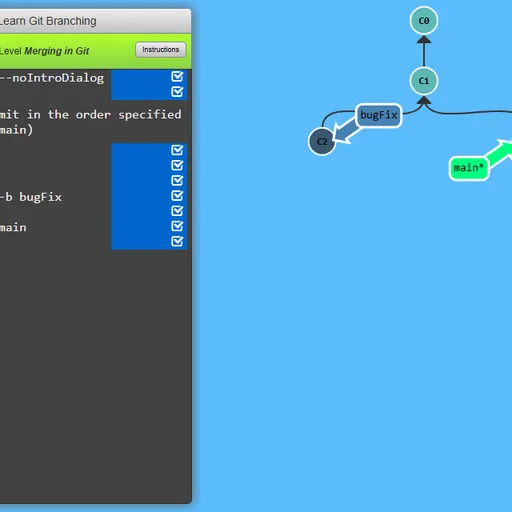
Learn Git Branching turns version control into a series of visual puzzles. A terminal sits on one side of the screen, and a live diagram of commits and branches fills the rest. Each level shows a target tree, and you type git commands until your tree has the same shape. Peter Cottle made it, and it covers everything from your first commit to rebasing across remotes.
What Is Learn Git Branching?
It is an interactive learning tool shaped like a puzzle game. Instead of reading about git, you see what each command does to the commit tree right away. Because it runs on a simulated repository in the browser, nothing touches the files on your computer.
How a Round Plays Out
- Each level opens with a short lesson, often with a step-by-step demo.
- Close the lesson, and the terminal is ready for input.
- Type a command such as
git commit,git branchorgit checkout, then press Enter. - Watch the circles and labels move to show what changed.
- Compare your tree with the goal window. Type show goal or hide goal to toggle it.
- When the trees match, the level is solved and the next one is offered.
Keys and Buttons for Learn Git Branching
| What you do | ⌨ Keyboard | 🖱 Mouse |
|---|---|---|
| Type a command | Type anywhere on the page, then Enter | — |
| Open the level menu and pick a level | Type levels, then arrow keys and Enter | Click a level number in the menu |
| Compare your tree with the target | Type show goal (or hide goal) | Click Show Goal on the level bar |
| Get a hint or read the lesson again | Type hint, or objective | Click Instructions on the level bar |
| Take back the last command | Type undo (or reset to start over) | — |
| Page through a lesson or close it | Right arrow or Enter for next, Left arrow for back, Escape to close | Click the arrows or the check mark |
Winning Strategies
- Read the goal carefully. Note where each branch label points before you type.
- Plan before typing. Fewer commands means a better result for the level.
- Use undo freely. Take back a step and try a different approach.
- Ask for hints. Type hint for a nudge or objective to reread the lesson.
- Practice in the sandbox. Test tricky commands there before tackling a hard level.
Handy Details
- A computer with a keyboard is required. The game cannot take input on phones or tablets.
- Typing show solution plays the answer, but the level will not be marked as solved.
- Type levels at any time to pick a different puzzle.
Who Should Play It
This tool is made for students, new developers and anyone who wants git to finally make sense. If you enjoy coding puzzles or step-by-step logic games, these levels make learning feel like play.
Played and checked by the KBHX Games team · updated