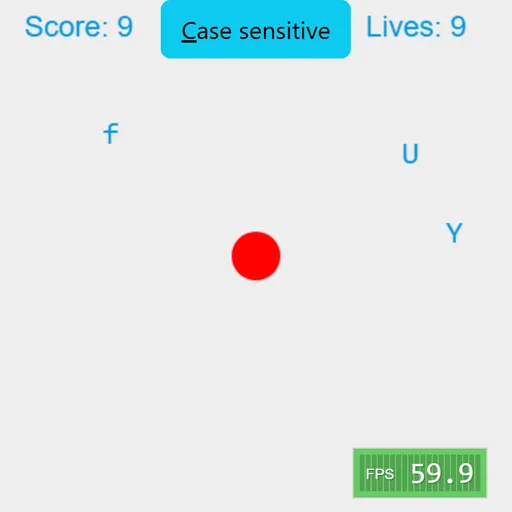
Typer Defense is a simple, focused typing game that sharpens how fast you find keys. A red core sits in the center of the screen, and single letters slide toward it from both sides. Press the right key and the letter pops into colorful dots. Miss it and the core takes a hit. There are no words to spell, just quick reactions, which makes it great for short practice sessions.
The Goal
Stop every letter before it reaches the core and keep your score climbing. You have 10 lives, shown in the top right. Each letter that gets through costs one life. When none are left, the game is over and you start again from zero.
How a Round Plays Out
- Letters appear at random heights on the left and right edges.
- Each one moves toward the core at its own speed.
- Press the matching key to destroy a letter and earn a point.
- Pressing a letter that isn’t on screen costs a point.
- If a letter touches the core, you lose a life and the screen clears before play goes on.
The game starts in case-sensitive mode, so capital letters need Shift and small letters need no Shift. Click the button at the top to turn this off. Then only small letters appear, and Shift doesn’t matter. Esc pauses at any time.
Keys and Buttons for Typer Defense
| What you do | ⌨ Keyboard | 🖱 Mouse |
|---|---|---|
| Destroy a letter | Press the matching letter key | — |
| Type an uppercase letter | Shift + the letter | — |
| Pause or resume | Esc | — |
| Switch case sensitive on or off | — | Click the "Case sensitive" button |
Winning Strategies
- Rank letters by danger. A fast letter halfway in is more urgent than a slow one near the edge.
- Hit twice for duplicates. If the same letter appears twice, one key press removes the newest copy, not the closest one.
- Start with lowercase only. Turning off case sensitivity lets you learn key positions before adding Shift.
- Don’t guess. Wrong keys cost points, so read the letter first.
- Pause during a rush. Esc freezes the screen so you can reset your focus.
Handy Details
- You need a physical keyboard. Phones and tablets won’t work.
- The game resizes to fit your window, with the core always in the center.
- A small frame-rate meter sits in the bottom corner.
Who Should Play It
Typer Defense is ideal for students learning to type, anyone warming up before work, and players who like quick reflex games. If you enjoy typing tutors or simple arcade defense games, you will like this one.
Played and checked by the KBHX Games team · updated