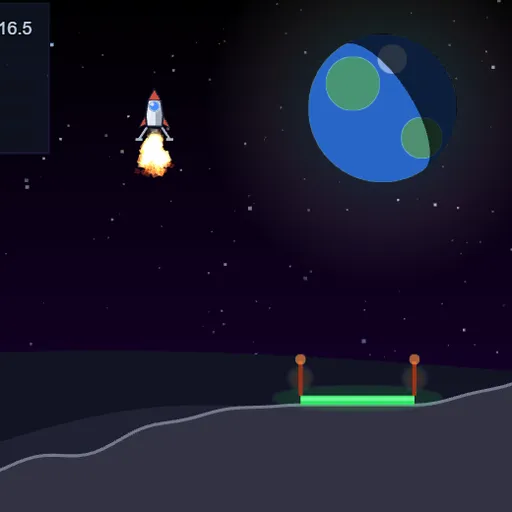
Moon Lander is a careful flying game about gravity, thrust and patience. Your craft starts high over gray hills, and a small green pad waits somewhere below between two beacon posts. You rotate the lander and fire short bursts to slow your fall and drift across. One crash ends the run, so every landing counts. It is part of Frank Force’s open-source LittleJS Arcade.
The Goal
Set the lander down on the pad, upright and slow, then do it again on a harder level. Each safe landing adds to your running score, and the game ends on your first crash with the level you reached on screen.
How a Round Plays Out
Press PLAY and the craft is already falling. Rotating changes where the engine pushes: point straight up to brake, or lean to slide toward the pad. The camera keeps both the lander and the pad in view.
The panel in the top left lists level, score and altitude, plus three bars. FUEL drains while the engine fires, and when it hits zero, the engine stops. SPD and TILT turn green inside the safe window and red outside it.
Land with both bars green and you move to the next level, which has new terrain and a pad in a new spot. Flying far past either side of the map also counts as a crash.
Keys and Buttons for Moon Lander
| What you do | ⌨ Keyboard | 🖱 Mouse | 👆 Touch |
|---|---|---|---|
| Rotate the lander | Left and Right arrows, or A and D | — | Push the on-screen stick left or right |
| Fire the main engine | Up arrow, W or Space | — | Round thrust button |
| Restart from level 1 | R | — | — |
| Use the menus and the CONTINUE dialog | — | Click the buttons | Tap the buttons |
Winning Strategies
- Fix drift early. Line up over the pad while you are still high, since correcting near the ground is much harder.
- Tap, do not hold. Long burns waste fuel and can push you back upward.
- Level out before touchdown. The tilt window is narrow, so finish rotating several meters up.
- Aim for the center. Later pads are barely wider than the landing legs.
- Treat fuel as score. Every leftover unit is worth 4 points, so a smooth descent pays twice.
Common Mistakes
- Burning hard at the last second and bouncing off the pad.
- Running out of fuel before the final braking burn.
- Drifting sideways off the map while chasing a far pad.
Who Should Play It
This one is for players who like precise, physics-based challenges and steady hands. If you enjoy flight simulators or gravity-based arcade games, each new level is a satisfying test.
Played and checked by the KBHX Games team · updated