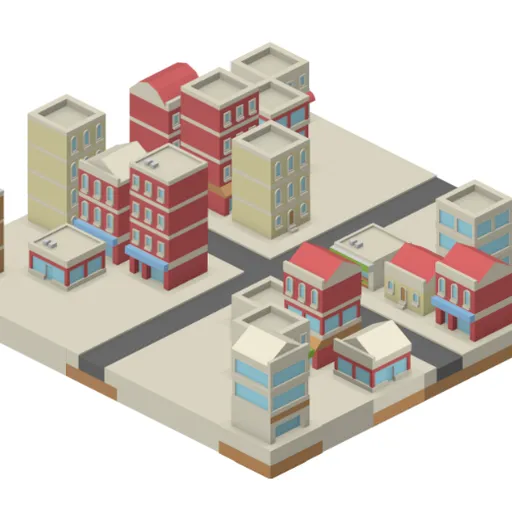
IsoCity is a small, calm sandbox for laying out an isometric town one tile at a time. You get a 7x7 square of empty ground and a palette of more than seventy hand-drawn pieces. There is no budget, no traffic and no score. The only thing to think about is how your town looks. Victor Ribeiro wrote the open-source original, and the colorful tiles come from Kenney’s free art library.
What Is IsoCity?
It is a creative building toy rather than a game with goals. You choose tiles and place them on the map to design streets, waterways and buildings. Because the map is small, you can see your whole town at once and change any part of it in seconds.
How a Round Plays Out
- Pick a piece from the palette on the left. Scroll the palette to see more.
- Click or tap a square on the map to drop the piece.
- The new piece replaces whatever was there before.
- With a mouse, hold the button and drag to paint the same piece across many squares.
- Right-click a square to clear it, or paint it with the plain ground tile.
- Your layout is saved in your browser each time you place a tile.
Keys and Buttons for IsoCity
| What you do | 🖱 Mouse | 👆 Touch |
|---|---|---|
| Pick a tile | Click it in the palette (scroll the palette for more) | Tap it in the palette |
| Place the tile | Click a square on the map, or hold the button and drag to paint | Tap a square on the map |
| Clear a square | Right-click it | Pick the plain ground tile (first in the palette) and tap the square |
Winning Strategies
- Lay roads first. A street grid gives the rest of the town a clear shape.
- Match road pieces carefully. Each road tile faces a set way, so check the palette picture.
- Plan a theme. Try a harbor town, a dense downtown or a canal village for a clear look.
- Mix heights. Tall towers next to low shops make the view more interesting.
- Leave some space. Open ground and trees keep a small map from feeling crowded.
Handy Details
- There is no way to win or lose. Your goals are your own.
- The map stays the same size, 49 squares in all.
- Clearing site data in your browser erases your saved town.
Who Should Play It
IsoCity is a good fit for relaxed, creative players who like to design without pressure. If you enjoy city builders or tile-painting sandboxes, this tiny town is a peaceful place to spend a few minutes.
Played and checked by the KBHX Games team · updated