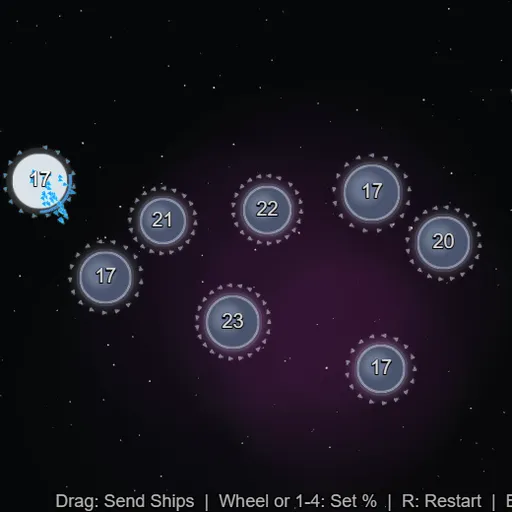
OrbitSwarm is a fast real-time strategy game played on one screen of planets. You begin with a single blue home world, the computer holds one red world, and gray neutral planets sit between you. Drag from a planet you own to send a stream of tiny ships. Every planet you own keeps building more, so each capture snowballs. It is part of Frank Force’s open-source LittleJS Arcade.
The Goal
Take every red planet to win and see your finishing time. If your last planet falls, the match is over. Most games last only a few minutes, which makes it easy to try again with a new plan.
How a Round Plays Out
- Pick EASY, MEDIUM or HARD on the title screen.
- Your home planet glows with a blue ring, and its number shows stationed ships.
- Press a planet you own, drag to a target and release. Half its ships leave by default.
- Change the share with the number keys or mouse wheel: 10%, 25%, 50% or 100%.
- Ships sent to your own planets reinforce them, which is how you shift forces to the front.
Neutral planets show defenders but do not grow until captured. Larger planets build faster and hold more ships. A ring around each of yours shows how full it is, and production stops at the limit. The rival plays by the same rules, and matches are silent.
Keys and Buttons for OrbitSwarm
| What you do | ⌨ Keyboard | 🖱 Mouse | 👆 Touch |
|---|---|---|---|
| Send a fleet | — | Press on your planet, drag to a target and release | Drag from your planet to a target |
| Set the share of ships sent | 1 = 10%, 2 = 25%, 3 = 50%, 4 = 100% | Scroll the wheel while dragging | — |
| Restart the match | R | — | — |
| Pause | Esc | — | — |
Winning Strategies
- Expand nearby first. Small, close neutrals with few defenders start paying back almost at once.
- Overpay slightly. Targets keep producing while your ships fly, so an exact count can come up short.
- Keep ships moving. A full planet stops building, so push extras toward the front.
- Counter right after it attacks. The rival tends to send half or more of a planet’s fleet, leaving it thin.
- Go all in rarely. An emptied planet is easy for the rival to take back.
Common Mistakes
- Attacking a big red planet before you have the economy to back it up.
- Spreading thin over many small fights at once.
- Letting your home world sit at its limit while the front starves.
Who Should Play It
OrbitSwarm fits players who like quick strategy with simple controls. If you enjoy territory-control games or real-time tactics on a small map, it delivers a full match in a coffee break.
Played and checked by the KBHX Games team · updated