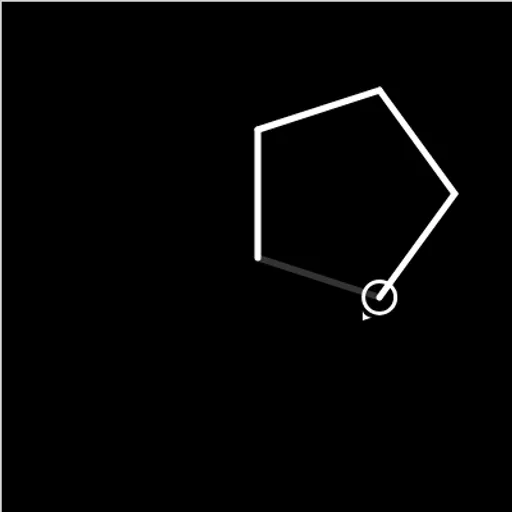
Block Code Turtle Art lets you draw with code. A small turtle, shown as a circle with an arrow, waits on a black canvas holding a pen. Each block you stack tells it to move a set distance or turn a set number of degrees, and it leaves a white line behind. The fun comes from seeing a handful of blocks inside a loop draw a shape that would take dozens of single steps.
The Goal
Copy the faint gray picture on each target level. A short message at the start tells you what to make, such as a square. When your drawing matches the outline, you can move on to the next level.
How a Round Plays Out
Open a category like Turtle or Loops, then drag blocks into the workspace and snap them together. Set the numbers on each block, such as how far to move or how far to turn. Press Run Program, and the turtle draws at the speed set on the slider.
If the lines match, a win message shows the JavaScript your blocks made. If they don’t, press Reset, change a number or the order of the blocks, and try again.
The ten levels go in this order:
- A square, then a pentagon.
- Stars made from only a few blocks.
- Four stars placed at the corners of a square.
- Yellow stars joined by white lines.
- A full moon built from 360 short lines, then a crescent.
- A blank canvas with extra blocks for logic, math, lists, variables and functions.
Keys and Buttons for Block Code Turtle Art
| What you do | 🖱 Mouse | 👆 Touch |
|---|---|---|
| Open a block category | Click Turtle, Loops or another category name | Tap the category name |
| Build the program | Drag blocks into the workspace and snap them together | Drag blocks with your finger |
| Change a distance, angle or color | Click the value on a block and pick a new one | Tap the value and pick a new one |
| Run or clear the drawing | Click Run Program, then Reset | Tap Run Program, then Reset |
| Change drawing speed | Drag the slider between the turtle and rabbit icons | Slide the speed control |
Winning Strategies
- Turn a full circle in total. The turns in a closed shape add up to 360 degrees, which brings the turtle back facing the way it started.
- Use 144 for a star. A five-point star turns 144 degrees at each tip, so the lines cross.
- Lift the pen to move. Pen up lets the turtle reach a new spot without drawing.
- Put a loop inside a loop. One loop draws a star, and an outer loop repeats it and moves to the next corner.
- Slow down when stuck. Drag the speed toward the turtle icon to see which line goes wrong.
Common Mistakes
- Using 72 degrees for a star, which only draws a pentagon.
- Forgetting pen down after moving with the pen lifted.
- Changing the wrong value when a loop repeats the error.
Who Should Play It
This is a good fit for visual learners, art fans and anyone curious about loops and angles. If you like geometry puzzles or doodle-style drawing toys, you will enjoy it.
Played and checked by the KBHX Games team · updated