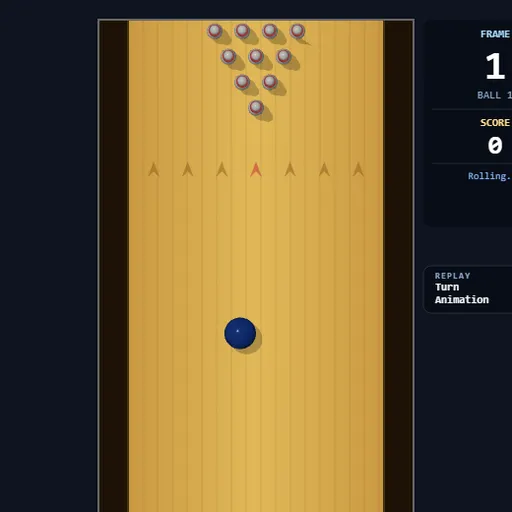
Strike Lane Bowling is a ten-pin bowling game where your mouse hand does the throwing. Instead of tapping a button and hoping, you pull back to build power and flick forward to release. The speed and direction of that flick decide how hard the ball rolls and how much it curves. A 3D camera replays your best shots, and a full scorecard runs along the bottom.
The Goal
Knock down as many pins as you can over ten frames. Standard scoring applies. A strike counts 10 plus your next two balls, and a spare counts 10 plus your next ball. A strike or spare in the tenth frame earns bonus balls, and twelve strikes in a row give a perfect 300.
How a Round Plays Out
- Click the lane or press Enter. The ball sits behind the red foul line.
- Move the mouse left or right to pick your starting spot.
- Hold Space and drag the mouse down to fill the power meter.
- Flick the mouse up quickly. The ball leaves as soon as the upward motion starts.
- Any sideways drift during the flick adds angle and spin, so the ball hooks as it travels.
- If the ball touches a lane edge, it drops into the gutter and can’t hit pins.
- Fallen pins are cleared before your second ball.
A side panel shows a short hint for each step, so you always know what comes next.
Keys and Buttons for Strike Lane Bowling
| What you do | ⌨ Keyboard | 🖱 Mouse |
|---|---|---|
| Start or restart a game | Enter | Click the lane |
| Aim (slide the ball left or right) | — | Move left or right while the ball waits at the foul line |
| Charge power | Hold Space | While holding Space, drag down |
| Throw, add angle and hook | Keep holding Space | Flick up fast; drift sideways during the flick to curve it |
| Cancel a charged throw | Esc, or let go of Space | — |
| Turn replays on or off | — | Click the Turn Animation switch |
Winning Strategies
- Charge before every throw. A sharp flick on a low meter still rolls slowly, so fill the meter first.
- Flick in one clean motion. A slow upward drag fires the ball early and wastes your power.
- Learn the straight ball first. Start from the center with no sideways drift until you can hit the head pin on demand.
- Offset for your hook. If your flick curves right, start a bit left of center so the ball bends into the pocket.
- Shoot spares straight. For one or two pins, line the ball up with them and flick straight ahead.
Handy Details
- This game needs a mouse and keyboard. It has no touch controls, so phones and tablets won’t work well.
- Press Esc or release Space to cancel a charged throw.
- Turning off replays speeds up practice sessions.
Who Should Play It
Strike Lane Bowling fits players who want a sports game with real feel and a skill curve. If you like physics-based sports games or mouse-gesture games, the hook shot will keep you coming back.
Played and checked by the KBHX Games team · updated