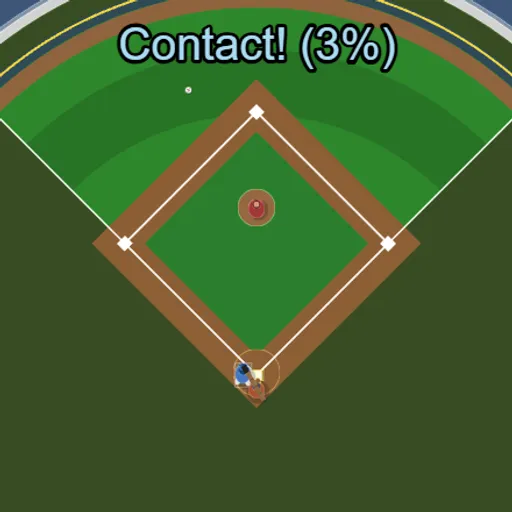
Backyard Slugger boils baseball down to the one moment that matters most at the plate: the swing. You watch from above as a pitcher throws to you in a small ballpark, and you press one button to swing. Hit it clean and fair, and the ball can sail over the outfield wall. With no innings or outs to worry about, it is an easy game to pick up for a few minutes.
The Goal
Your aim is home runs. A ball counts only if it clears the fence between the two white foul lines. Along the way, the game tracks your hits, perfect hits, homers and longest drive, so you always have a number to beat.
How a Round Plays Out
Press Play and the first pitch comes in shortly after. Pitches vary in speed and location. Roughly two out of three head for the yellow strike zone over the plate, and the rest miss high, low or wide.
Swing with Space, a click or a tap. The bat takes about a quarter of a second to sweep through. On contact, a percentage shows how clean the hit was. The ball leaves at a right angle to the bat, so swinging early or late sends it toward the foul lines.
The count works like a real at-bat. A missed swing or a pitch you take in the zone is a strike. A pitch outside the zone that you leave alone is a ball. Three strikes or four balls reset the count, and so does any hit.
Keys and Buttons for Backyard Slugger
| What you do | ⌨ Keyboard | 🖱 Mouse | 👆 Touch |
|---|---|---|---|
| Swing the bat | Space (gamepad A) | Left click | Tap the screen |
| Call the next pitch right away | Enter | — | — |
| Reset your session stats | R | — | — |
| Pause, restart or quit | Esc | Click the menu icon (top right) | Tap the menu icon (top right) |
Winning Strategies
- Swing before the ball arrives. The bat needs a moment to come around, so start while the pitch is still a few steps out.
- Take the wild ones. Pitches outside the zone become balls if you hold back, so there is no reason to chase.
- Aim for the tip. The best contact comes near the end of the bat and on its center line.
- Correct after fouls. A ball pulled foul down the left line means you were early. A ball going foul to the right means you were late.
- Call pitches with Enter. Skipping the pause keeps your timing steady between swings.
Handy Details
- Press R to clear your session stats and start fresh.
- It works on touch screens, but the view is wide. Turn your phone sideways, or parts of the field get cut off.
- Esc opens the menu to pause, restart or quit.
Who Should Play It
This is a nice pick for sports fans and anyone who likes simple timing games. If you enjoy one-button reflex games or casual baseball batting challenges, you can get a lot out of short sessions here.
Played and checked by the KBHX Games team · updated