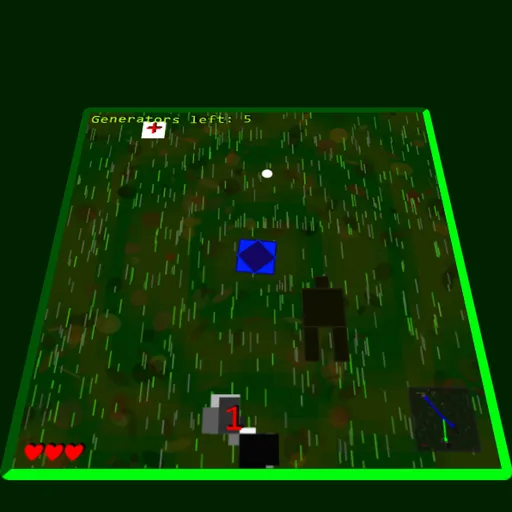
Can’t Get Back is a small top-down escape game set on a tilted, glowing board. You guide a spinning shape through tall grass while the field keeps rolling past. Anything that drifts too far behind you is erased forever, so you can never turn around for a missed chance. It was made by Kipkat for the js13k contest in 2019, and its odd mood is worth a look.
What Is the Goal?
Each level hides a set of gray generators marked with numbers. You must turn them on in order, starting at 1. A counter in the top corner tells you how many are still left. Finish them all and you climb to the next level.
Along the way, black squares with red edges chase you. Every time one touches you, you lose a heart and get thrown across the board. Lose every heart and the run on that level is over.
How a Round Plays Out
Press Space at the title screen, then steer with the arrow keys and watch for numbered machines. When you reach the one with the next number, press E to switch it on. Try a higher number too soon and the game shows “Can’t activate.”
Each working generator restores a lost heart. To keep the squares away, fire with W, A, S and D. Your shots curve toward the nearest square and push it back.
Each new level changes the colors, makes the music faster, adds one heart to your total and puts one more generator into the chain. Levels never run out.
Keys and Buttons for Can't Get Back
| What you do | ⌨ Keyboard |
|---|---|
| Start the game or restart after dying | Space |
| Move | Arrow keys |
| Shoot up, left, down or right | W, A, S, D |
| Use a generator or pickup | E |
| Mute the music (after the current loop) | M |
| Low-detail mode for slow devices | L |
Winning Strategies
- Check the radar often. The box in the lower corner marks generators in green, squares in red and pickups in blue.
- Stay near your target. If the right generator scrolls too far away, it is gone and you must wait for a new one with that number.
- Push squares toward the edge. A square only leaves for good once it is knocked off the board, so aim shots to drive it outward.
- Keep the medkit for later. The white box with a red cross fills every heart, so it is wasted when you are healthy.
- Use the statue in a crowd. Praying at the dark statue makes you safe for about eight seconds while squares bounce off you.
Handy Details
- You need a keyboard to play. There are no touch controls.
- Press M to mute the music after the current loop, or L for low detail on a slow device.
Who Should Play It
This is for players who like odd, moody indie games with simple rules and a steady rise in difficulty. If you enjoy top-down shooters or endless survival games, give it a try.
Played and checked by the KBHX Games team · updated