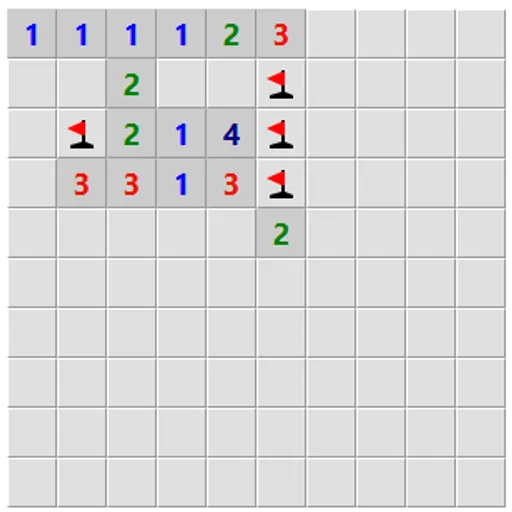
Logic Mines is a mine-clearing grid with a twist that changes how you think. The mines are not placed when the board appears. Instead, a solver decides their locations as you play and always chooses the worst result for a risky click. The flip side is fair: when you truly have no safe move, your guess always works. That makes every loss a missed deduction, never bad luck.
The Goal
Uncover every square that does not hold a mine. Each opened square shows how many of its eight neighbors are mines. Your first click is always safe, and the round is won once only mines remain covered.
How a Round Plays Out
Choose Easy, Medium, Hard or Expert, or type custom dimensions up to 30 by 30, and press New game. After the opening click, read the numbers around the open area.
If you can prove a square is empty, open it. If you can prove one is a mine, flag it. Flags let you double-click or middle-click a number to open all its other neighbors at once.
If you click a square that only might be safe while a proven safe square exists elsewhere, it becomes a mine and you lose. When no proof is possible anywhere along the edge, any edge square that could be empty is treated as empty.
After a loss, small markers appear on edge squares. A dot means it was provably safe, an exclamation mark means it was a sure mine and a question mark means it could go either way.
Keys and Buttons for Logic Mines
| What you do | 🖱 Mouse | 👆 Touch |
|---|---|---|
| Reveal a square | Left-click | Tap |
| Cycle flag, question mark, blank | Right-click | Press and hold for half a second |
| Open all neighbors of a number whose mines are flagged | Double-click or middle-click the number | — |
| Reveal a square in safe mode | Double-click | — |
| Start a new board | Click "New game" | Tap "New game" |
Winning Strategies
- Scan the whole edge first. A safe square might sit far from where you were working.
- Flag every sure mine. It makes the quick-open shortcut work and keeps your counts honest.
- Ask for a hint when stuck. It says whether a safe square exists, whether you must guess or whether a flag is wrong.
- Switch on countdown numbers. Each clue then shows unflagged mines left around it, so many patterns shrink to zeros.
- Use safe mode on touch screens. Opening then needs a double tap, which stops stray touches from ending the round.
Common Mistakes
- Guessing out of habit when a provable square still exists.
- Clicking far from the open area without the guess-anywhere option turned on.
- Ignoring the after-loss markers that show the move you missed.
Who Should Play It
This suits careful thinkers who want mine-clearing without coin flips. If you enjoy number-clue grids or deduction puzzles where every step can be justified, it offers a cleaner, fairer challenge.
Played and checked by the KBHX Games team · updated