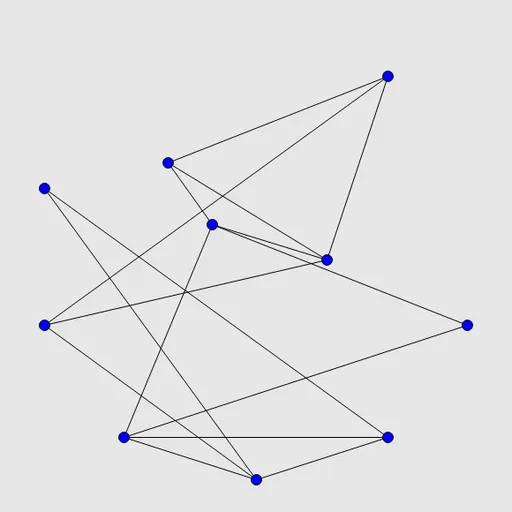
Untangle Lines is a soothing drag-and-drop puzzle about turning a messy knot into a neat picture. You get a set of dots joined by straight lines that cross all over each other. Move the dots, and the lines stretch to follow. Once nothing crosses, you are done. It comes from Simon Tatham’s puzzle collection and is perfect for unwinding.
The Goal
Rearrange the points so that no line crosses any other line. The connections never change, only the positions of the dots. When the last crossing disappears, the board flashes to show you’ve solved it.
How a Round Plays Out
- A new puzzle places every point evenly around a circle, so lines cut through the middle in a tangle.
- Press on a point and drag it to a new spot. All lines attached to it move along.
- Let go and look at what changed. Some crossings vanish, others may appear.
- Keep moving points until the drawing is flat.
- Use Undo to step back one drag, Restart to return to the circle, or Solve to see a finished layout.
You can also pick and move points with the keyboard, and the Type menu sets the number of points.
Keys and Buttons for Untangle Lines
| What you do | ⌨ Keyboard | 🖱 Mouse | 👆 Touch |
|---|---|---|---|
| Move a point | — | Click and drag the point | Drag the point with your finger |
| Pick and move a point by keyboard | Arrow keys or Tab/Space to choose a point, Enter to pick it up, arrows to move, Enter to drop | — | — |
| Undo, redo, new puzzle | U / R / N | Undo move, Redo move and New game buttons | Undo move, Redo move and New game buttons |
| Change the number of points | — | Type menu | Type menu |
Winning Strategies
- Build from a triangle. Find three points that all connect to each other and spread them out as a frame.
- Place simple points first. Dots with only two or three lines are easy to tuck in. Save the busy ones for later.
- Use the whole board. The starting circle leaves empty space, so move finished groups toward the edges.
- Fix one crossing at a time. Pick a single crossing pair and slide one end around the other.
- Turn on the highlight. The crossing preference shows exactly which lines still need work.
Handy Details
- On a touch screen, press on a point and slide. A quick tap alone does nothing.
- Grid snapping in Preferences makes tidy layouts easier.
- Bigger puzzles of 20 or 25 points take noticeably longer.
Who Should Play It
Untangle Lines is great for players who want a relaxing, no-pressure puzzle that still uses spatial thinking. If you like line-connecting puzzles or calm drag-based brain games, this one is easy to love.
Played and checked by the KBHX Games team · updated